Overview
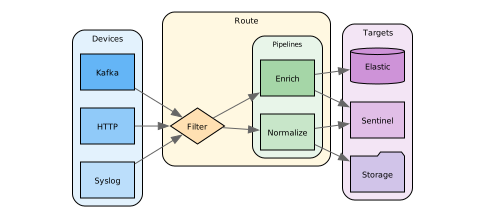
Routes are the orchestration layer in the DataStream processing flow. They bind devices, pipelines, and targets into complete processing workflows, determining what data goes through which pipelines and reaches which destinations.
Provider → Device → Preprocessing → Pipeline → Postprocessing → Target → Consumer
Route (orchestrates the entire flow)
Definitions
Routes are made up of filtering expressions and sequences of processors that shape the format and flow of data streams. They curate data through an evaluation process and forward it to downstream consumers.
Their behavior is characterized by three key elements:
-
Devices - One or more sources to ingest data from
-
Pipelines - Optional processing schemes applied to selected events
-
Targets - One or more destinations to forward the processed data
In addition to these, there is one more consideration that involves the binary relations between devices and pipelines, pipelines and targets, or directly devices and targets: the optional filter expressions that match specific events.
Route Creation Methods
DataStream provides two approaches for creating routes:
Quick Routes use a visual drag-and-drop interface for simple device-to-target connections with optional pipeline processing. Best for straightforward data flows.
Advanced Routes use a multi-step wizard supporting complex filtering, conditional logic, Director selection for targeted execution, and scheduling for batch processing. Best for enterprise routing scenarios.
Both methods produce the same underlying YAML configuration. The GUI approach is covered in the Routes Management documentation.
Configuration
All routes share the following base configuration fields:
| Field | Required | Default | Description |
|---|---|---|---|
name | Y | Unique identifier for the route | |
description | N | Optional explanation of the route's purpose | |
devices | N | List of source IDs to collect events from | |
if | N | Expression determining if the route applies to an event | |
pipelines | N | List of pipelines to process matching events (processed in parallel) | |
targets | N | List of targets to deliver processed events to | |
status | N | true | Enable/disable the route |
properties | N | Additional route configuration (see below) |
Routes support additional configuration via the properties field:
| Property | Required | Default | Description |
|---|---|---|---|
cron | N | Cron expression for scheduled route execution | |
interval | N | Execution interval (30s, 5m, 2h, or raw seconds) | |
conf | N | Route-specific configuration map merged into pipeline context | |
no_buffer | N | false | Disable buffering for the route |
When both cron and interval are omitted, the route processes events in real time. If cron is set, it takes precedence over interval.
Do not confuse field names like pipelines or targets with the component entries at the first level. As the highest level of a telemetry configuration, routes orchestrate the stream by specifying the components that constitute the traffic.
Enlisted devices, targets, and pipelines must be configured in advance to be usable by routes. Use their ids or names to refer to them.
Example:
routes:
  - name: syslog_to_backup
    devices:
      - name: syslog_*
    pipelines:
      - name: normalize
      - name: enrich
    targets:
      - name: backup
This route receives data from devices with the prefix syslog_ in their names, transforms it using the normalize and enrich pipelines, and forwards it to the backup target.
Deployment
Forwarding data involves several design patterns (use of pipelines is optional in each case):
-
Single source to single target
Syslog → Route → [Normalize] → Storage
-
Single source to multiple targets
Syslog → Route → [Enrich] → Monitoring + Storage + Backup
-
Multiple sources to single target
Syslog + Apache → Route [Normalize] → Central Analytics
-
Multiple sources to multiple targets
Syslog + Winlog + Apache → Route [Normalize ∘ Enrich] → Cloud Upload + Central Analytics
Routes can include zero or more pipelines. Multiple pipelines process data in parallel. A pipeline's processors can override routing using the reroute processor, and the final processor terminates execution.
Use Cases
Some scenarios demonstrating the uses of routes:
-
Security Event Workflow:
routes:- name: security_criticalif: "event.category == 'security' && event.severity == 'critical'"pipelines:- name: security_enrichment- name: threat_intelligencetargets:- name: siem_platform- name: security_team_notification- name: security_standardif: "event.category == 'security'"pipelines:- name: security_enrichmenttargets:- name: security_elasticsearch -
Data Segregation:
routes:- name: pci_dataif: "tags.contains('pci')"pipelines:- name: pci_compliance- name: data_maskingtargets:- name: pci_storage- name: hipaa_dataif: "tags.contains('hipaa')"pipelines:- name: hipaa_compliance- name: phi_protectiontargets:- name: hipaa_storage -
Environment Separation:
routes:- name: production_logsif: "kubernetes.namespace == 'production'"pipelines:- name: production_enrichmenttargets:- name: production_elasticsearch- name: development_logsif: "kubernetes.namespace == 'development'"pipelines:- name: dev_enrichmenttargets:- name: development_elasticsearch
Implementation Strategies
The following aspects of your telemetry stream must be considered in the implementation of routes:
-
Conditional Routing:
Selecting events involves evaluating boolean expressions such as:
device.type == 'syslog'
dataset.name == 'firewall_logs'
log.severity > 4
!(source.ip == '10.0.0.1'||source.ip == '10.0.0.2')Key points about route evaluation:
- All routes are evaluated for every event in parallel
- Each route independently filters events using its
ifcondition - Events matching multiple route conditions are processed by all matching routes
- Route conditions are evaluated before pipelines begin their work
- Multiple targets within a route receive identical copies of the same data
Examples of conditional routing:
routes:- name: critical_alertsif: "event.severity == 'critical'||event.severity == 'high'"pipelines:- name: alert_enrichmenttargets:- name: alerts_webhook- name: security_team_email- name: normal_logsif: "event.severity == 'low'||event.severity == 'medium'"pipelines:- name: standard_processingtargets:- name: logs_elasticsearch -
Parallel Route Processing:
All routes are processed concurrently. Use distinct
ifconditions to control which events each route handles:routes:- name: urgent_alertsif: "event.severity == 'critical'"targets:- name: alerting_system- name: security_eventsif: "event.category == 'security'"targets:- name: security_platform- name: general_logstargets:- name: log_storageIn this example, a critical security event would be processed by all three routes simultaneously.
-
Device Selection:
Routes can collect data from specific devices:
routes:- name: network_trafficdevices:- name: firewall_logs- name: router_logs- name: switch_logspipelines:- name: network_enrichmenttargets:- name: network_monitoring -
Multiple Pipelines:
Routes can apply multiple pipelines, which are processed in parallel:
routes:- name: web_securitydevices:- web_server_logsif: "event.category == 'web' && event.type == 'attack'"pipelines:- common_enrichment- attack_detection- threat_scoringtargets:- security_elasticsearchEach pipeline processes the event data independently and concurrently.
-
Multi-Target Delivery:
Routes can send processed data to multiple destinations:
routes:- name: compliance_eventsif: "tags.contains('compliance')"pipelines:- name: compliance_formattingtargets:- name: compliance_elasticsearch # For searching and analytics- name: compliance_s3 # For long-term retention- name: auditor_webhook # For real-time notification -
Unconditional Routes:
Routes without an
ifcondition process all events:routes:- name: primary_securityif: "event.category == 'security'"targets:- name: security_elasticsearch- name: all_events# No if condition - processes every eventtargets:- name: general_elasticsearchSince routes run in parallel, events matching
primary_securitywill also be processed byall_events. -
Scheduled Routing:
Routes can execute on a schedule instead of processing events in real time. Use
properties.cronfor cron-based scheduling orproperties.intervalfor fixed intervals:routes:- name: hourly_compliance_exportif: "tags.contains('compliance')"pipelines:- name: compliance_formattingtargets:- name: compliance_s3properties:cron: "0 * * * *"- name: periodic_health_checkpipelines:- name: health_aggregationtargets:- name: monitoring_dashboardproperties:interval: 5mThe first route runs at the top of every hour. The second route runs every 5 minutes. When both
cronandintervalare omitted, the route processes events in real time. -
Route Templates:
Use environment variables for flexible configurations.
routes:- name: dynamic_routingif: "${ROUTING_CONDITION}"pipelines:- ${PRIMARY_PIPELINE}- ${SECONDARY_PIPELINE}targets:- ${TARGET_SYSTEM}For pre-built route configurations bundled with pipeline templates, see Content Hub route integration.